
Build and deliver immersive
VR learning experiences in
minutes, not months.
Equip your learners with hands-on experience in safe, repeatable virtual environments. Design layouts, build scenarios, deploy to headsets or web browsers, and measure competency — all from one platform.
Realistic environments. Any facility.
From server rooms to outdoor generator yards — build any facility your learners require.
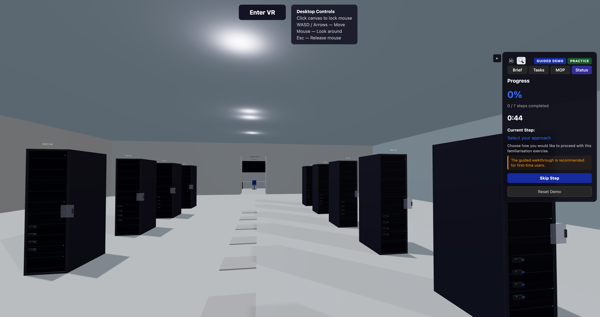
Data Centre — Server Rack Inspection
Step-by-step guided walkthrough with progress tracking
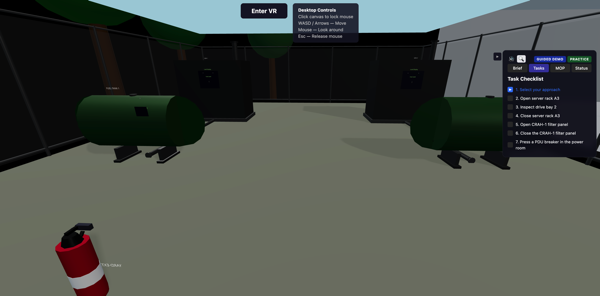
Outdoor Area — Equipment & Safety
Task checklist with interactive equipment hotspots
Take a tour of FacilityVR in 38 seconds.
From prompt to fully-explorable VR scenario — no manual modelling, no game-engine pipeline.
A complete training, recruitment and talent-development ecosystem
One platform that joins people learning new skills, the people delivering the training, and the people hiring the resulting talent
same identity, same tools, same great outcomes.
Scenarios
Two scenario types — Perform for procedural training, Produce for spatial reasoning — paired with Workbook course steps for diagnostic and analytical exercises. Cooperative scenarios also strengthen communication, teamwork, and other employability skills.
Courses
Wrap scenarios in a full LMS: Add videos, readings, auto-graded quizzes, and reinforcement activities. Or use our AI Course Builder to draft entire courses from a simple prompt in 15 languages.
Learn moreCareer Portals
Free of charge, employers can create and manage career pages, post internships & job openings, and advertise events to connect with potential employees while they are still training.
In-house training
Recruited a new hire? Stand up a connected FacilityVR Team account and continue their development with the same familiar tools that prepared them for the role. Perfect for onboarding, upskilling, and internal mobility programs.
Learners are trained on curriculum aligned with industry needs and can apply directly to a partnered Employer with their record attached — no re-typing, no portfolio scramble. The Employer hires them, then uses the same platform to onboard them and continue their inhouse learning & development. It’s a virtuous circle of better training, better hiring, and a better workforce.
Customer success stories
How leading training providers are putting FacilityVR to work.
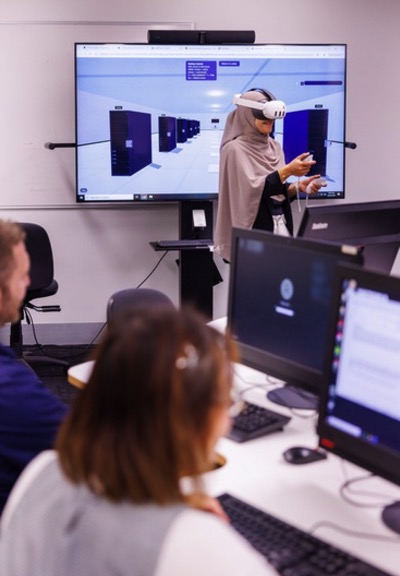
Victoria University — Microsoft Datacentre Academy
Students train on large-scale critical infrastructure in virtual reality
Victoria University
Simulating critical infrastructure for the next generation of data-centre technicians
When Victoria University launched its Microsoft Datacentre Academy, it chose FacilityVR to build the virtual reality tools that simulate student interaction with large-scale critical infrastructure — giving learners safe, repeatable hands-on experience with environments that are impossible to practise in for real.
Read more about the partnership in the Victorian TAFE Association’s Partners in Prosperity report.
More than the simulation
Real competence is more than moving through a scene. FacilityVR also drills the record-keeping and control-room instincts that professional work depends on.
Get the paperwork right, every time
A hands-on job is only half the record. Our comprehensive Documents tool lets learners practise completing real workplace paperwork — accurately, and to the standard an auditor expects. Build any form your organisation uses and set it as a course step.
- Asset registers and equipment records
- Maintenance plans, schedules and logs
- LOTO (lock-out / tag-out) permits
- Any other organisational form — matched to your own
Design living control panels with Telemetry Studio
Compose a custom “single pane of glass” for any facility on a freeform canvas — live gauges, LED displays, dials, switches, labels and alarms. Trainees monitor real-time signals, respond to injected faults, and act on alerts, right in the browser.
- Live signals drawn from your equipment telemetry
- Faults and alerts that fire on start, on a timer, or on a trainee’s action
- Interactive controls learners operate to drive the system
- Drop a surface straight into a course as a telemetry step
Stop paying for pixels you don't need
Custom-built VR projects cost tens of thousands and take half a year or more to develop. FacilityVR replaces the manual coding process with an AI powered prompt-to-scene workflow. Same pedagogical outcomes as a heavy game-engine build for a tiny fraction of the cost and wait time.
Start nowFrequently asked questions
What hardware do I need? +
Do I need 3D design or coding skills? +
What industries is FacilityVR suitable for? +
How long does it take to create a scenario? +
Can multiple learners use it at the same time? +
How are learners assessed? +
Is my data secure? +
What does it cost? +
Ready to transform your teaching?
Get in touch for a demo, or start building your first VR environment today.